I need some help with the dbtrace command in Maya

So, I’m trying to debug an issue I’m having with my rig when it gets evaluated in serial/parallel mode, and I’m attempting to use the dbtrace command as documented here:

According to the docs, the way I’m using the trace should output a list of nodes that don’t evaluate correctly, and the plug/attribute that is missing/throwing the error. Something like this:

Detected missing dependencies on frame 56
{
     A.output <-x- B
     A.output <-x- C [cluster]
}
Detected missing dependencies on frame 57
{
    A.output <-x- B
    A.output <-x- C [cluster]
}

However, when I run the trace, it will say that it detects missing dependencies, but will not display the nodes that are in error, like this:

150:56:41.311080 | Detected missing dependencies on frame 0
150:56:41.311097 | {
150:56:41.359292 | }
150:56:41.378312 | Detected missing dependencies on frame 1
150:56:41.378329 | {
150:56:41.424479 | }

I was wondering if anyone has run into this before and has an idea of what’s going on/what I might be doing wrong.

Thanks in Advance!
Not sure about the dbtrace command but you could use the evaluation toolkit(window>general editors>evaluation toolkit).

It can give you almost all you need and render it out in a nice graph as well

Maybe it can also give you a better report on why the dbtrace could be failing

1 Like

Thanks for the advice @peerke88!

I’ve been messing around with the evaluation graph inspector tool, and I have some questions about interpreting the visual outputs, and also, I think, a question about how the EG propagates dirty plugs.

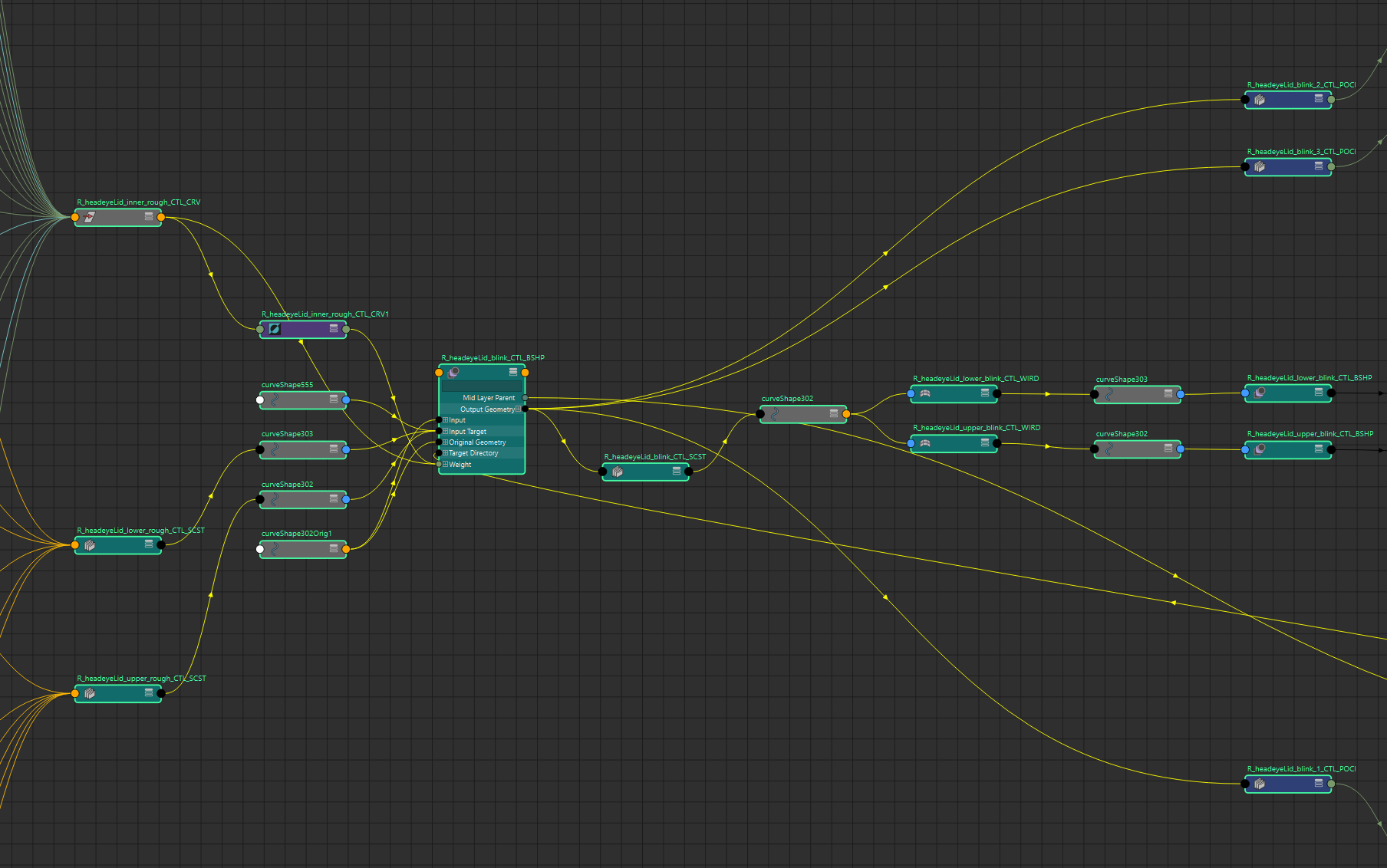
First, these are the nodes I’m looking at (this is a rig for some eyelids, it’s a little complicated so it would be a lot to show everything)(and I apologize for some of the rough naming):

and this is the output of the scheduling graph tool:

My question is: does this imply that the separate “rows” of nodes are evaluated concurrently? As in it would try to evaluate “R_headeyeLid_blink_3_CTL_POCI” at the same time as “R_headeyeLid_blink_1_CTL_POCI”? (I’m running this in serial mode but let’s pretend)

Second question:
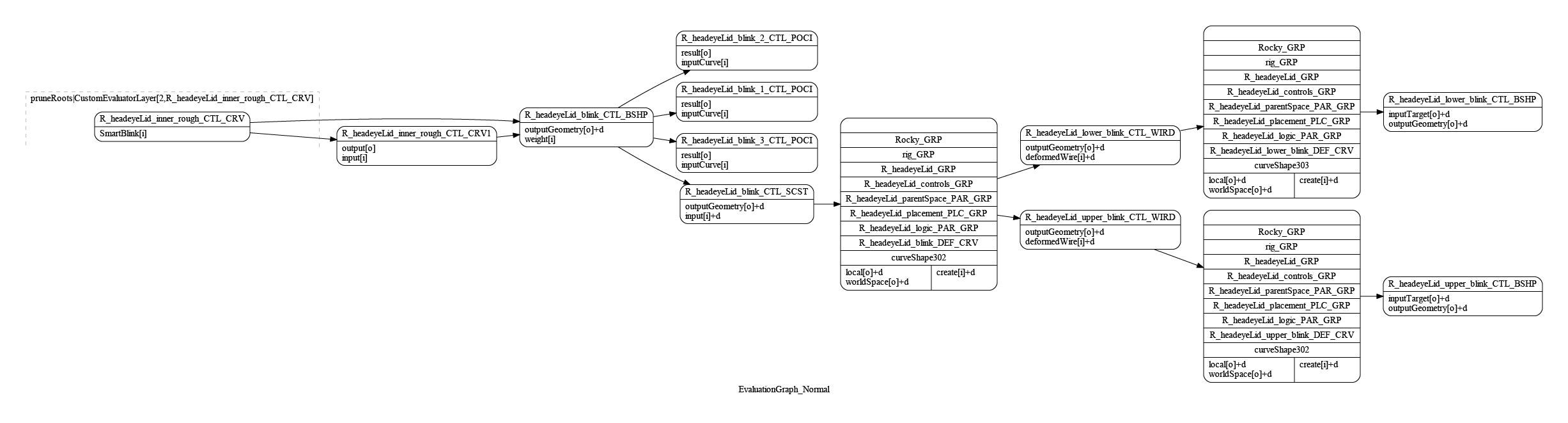
This is the output of the evaluation graph visualizer for the selected nodes:

From my understanding, the Evaluation Manager generates a new evaluation graph whenever some specific changes happen to the scene, including when a new node gets it’s attributes keyed in the timeline. In this scene, the only change I’ve made since it’s been opened has been to add two keys to an attribute on “R_headeyelid_inner_rough_CTL_CRV”. My assumption is that this would trigger the EM to rebuild the EG, starting from the newly dirty keyed attribute. However, looking at the graph above, it looks like only some of the downstream attributes from the keyed “smartBlink” attr have been marked dirty, and not all of the ones I’d expect. Would there be some caching going on or something?

It’s probably difficult to have an exact answer with only a subset of the graph, and I apologize, but I wanted to keep things legible. I guess my question is would anyone know why only a subset of the attributes downstream of a changing attr might be marked dirty.

Sorry for the long questions, I have some experience doing pipeline stuff with Maya but I’m pretty new to rigging.

Okay, so for the first question I had, it turns out that (when in serial mode, at least) the “rows” of nodes sequences are evaluated serially, but are not directly connected one after another and have a large number of intermediate nodes scheduled between them. It appears that they are ordered earliest to latest from bottom to top, so the bottom row would run, then eventually the row above that, then eventually the one above that, and so on.

I’m sure this behavior is different in parallel mode but I haven’t been testing that.

sorry for the late reply,

for parallel evaluation i tend to only focus on the cycle clusters
in the evaluatuin toolkit you can list cycleclusters based on the amount of nodes that are part of a cluster, in general you want these to be as small as possible to make sure that more nodes evaluate in parallel, the bigger the cluster the more nodes are part of a single evaluation. this also takes into account the parenting structure not just the node connections.

1 Like

That makes sense, thanks for the advice! I did a run and it looks like I don’t have any clusters larger than 2 nodes, and it looks like those are all constraints, so I think I’m doing pretty well on that front. I do appreciate you pointing me towards the evaluation toolkit, it’s really useful!

The actual issue I was trying to diagnose (and I suppose I should have said this earlier, but I didn’t want to muddy up the question) was a crashing issue I was having when evaluating the rig in serial and parallel mode. It seems that Maya would crash under certain circumstances whenever it attempted to evaluate one of the PointOnCurveInfo nodes (marked “_POSI” in the graph screenshots). It wouldn’t crash every time, so the issue only became apparent when frame caching was turned on, and Maya 2024 wasn’t be able to output a .log or .dmp file when it occured (luckily 2026 did!), so I was having trouble debugging and was hoping the EG visualizer might have some clues. The debug tool that gave me the most useful output was running dbtrace with the “compute” keyword, which managed to print out that the pointOnCurveInfo nodes were the last things getting evaluated before the crash.

Ultimately, I did fix the issue by putting an intermediate curve between the blink blendshape and the pointOnCurveInfo nodes, but I was never able to figure out what the problem was, exactly.

Now the question is, what’s the etiquette here for marking the solution?

On the one hand, the underlying issue that prompted my original questions was solved, so I could mark my fix for that as the solution. But on the other hand, that solution doesn’t have much to do with my original question, and I’m still curious about how the EM marks nodes dirty because it seems like my intuitions are wrong, looking at the EG graph, so maybe I don’t mark any solution. But on the other other hand the answer to that question is probably a long “it depends” type thing that no one is going to bother typing out even if they do know, and I really appreciate @peerke88 ‘s help, so maybe he should tag his post on cycle clusters with the solution?

This is all overthinking it, I’m sure, but I’m new posting here and I want to be polite.

1 Like