Eyerig/Grow vertex selection along the correct edge loop direction

Hi everyone, I’m trying to automate the creation of a facial rig.
For the eye, I followed this great tutorial: https://www.youtube.com/watch?v=-rtys3vFmso&t=30s.

I’ve finished writing the code for the structure, and now I’d like to apply clean weighting to the area around the eye.

Since in this rig each vertex along the eye’s edge loop has its own joint, my plan is as follows:

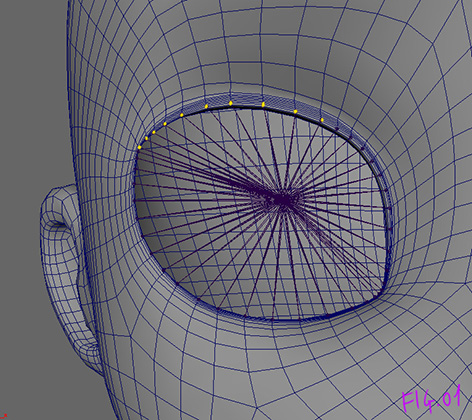
  1. Identify the vertex associated with each joint (fig.01)

    Fig.01

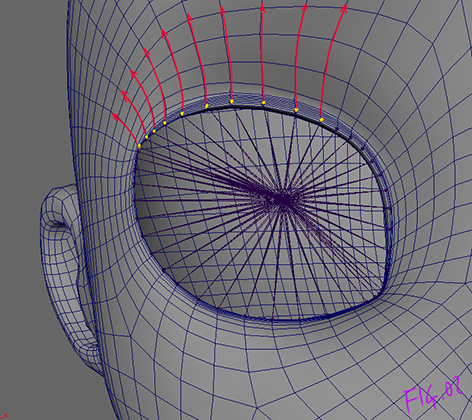
  2. For each identified vertex, expand the selection by a given number of vertices and create an ordered list of vertices for each branch (fig.02)

    Fig.02

  3. Once all branches have been defined, apply the vertex weights for each branch in an orderly manner. For example:
branch_01 = (vtx[0], vtx[1], vtx[2], vtx[3], vtx[4], vtx[5])

vtx[0] = [(“eye_joint”, 1.0), (“main_joint”, 0.0)] # first vertex weight
vtx[1] = [(“eye_joint”, 0.8), (“main_joint”, 0.2)] # second vertex weight
vtx[2] = [(“eye_joint”, 0.6), (“main_joint”, 0.4)] # third vertex weight
vtx[3] = [(“eye_joint”, 0.4), (“main_joint”, 0.6)] # fourth vertex weight
vtx[4] = [(“eye_joint”, 0.2), (“main_joint”, 0.8)] # fifth vertex weight
vtx[5] = [(“eye_joint”, 0.0), (“main_joint”, 1.0)] # sixth vertex weight

or driven by a formula that automatically assigns the weights (fig.03).

Fig.03
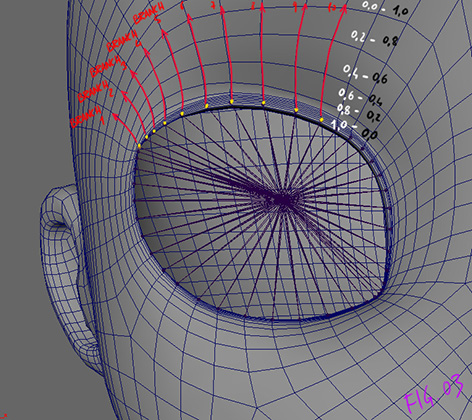
(For clarity, I haven’t labeled all the vertices in the pictures)

Of course, this is just the approach that came to mind based on my experience. I’m not sure if there are simpler or more efficient methods, so I’d really appreciate hearing other perspectives.

However, if I proceed with this approach, my issue lies in step 2.

After identifying the first vertex, how can I ensure that the selection of subsequent vertices follows the correct direction along the intended edge loop?

I’ve tried several solutions, but none of them have proven to be truly reliable. Does anyone have suggestions or alternative approaches?

(I hope I’ve made myself clear, and I apologize if this was too long.)
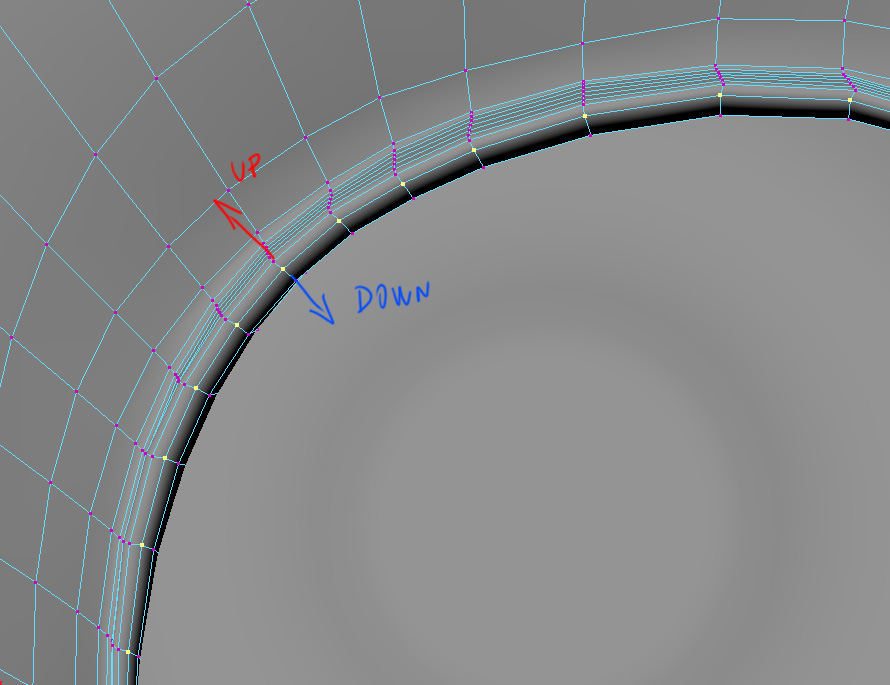
So this may be useful to try understanding. The way I solve that problem seems very useful for your issue:
https://www.tech-artists.org/t/get-vertices-of-an-edge-loop-and-sort-them-around-their-unit-circle/14649/2

So here’s one way I’d approach this. It could ABSOLUTELY be optimized, but it’s a start.

First you need to know which way is “out” from your verts. Luckily, the vertices of a face in Maya are always counter-clockwise. So if you know the order of your joint verts, and you know the winding order of a face, you can figure out if a face is outside or inside your vertex loop.
So convert your vertex selection to a face selection, then for each face get its verts in-order, and figure out if that face is outside your ring.

Repeat that process to get all the rings in order.

Then, for every vert in your rings, grow a selection from it, and figure out which vert is in the next ring out.

Hi tTox_TD!
Thank you so much for your reply !

In the post you mentioned, the concept of excluding neighboring vertices helped me find a solution when the starting edgering is the outermost edge.
(And finally, after a few tries, I have some working code.)

this is the approach I took, in case it might be helpful to others:

  1. First, I create a list of the vertices of the first edgering.
  2. Then I create a second list containing the vertices of the first edgering plus the neighboring vertices

3)At this point, I create a third list, which is the difference between the second and the first. (This is the next edgering!)

  1. I repeat these steps (n times) to find the following edgerings.

5)Now that we have a list for each edgering in sequential order, to find the edge loops that branch off from the vertices of the first edge ring, I intersect the cardinal neighbors (up, down, left, right) of each vertex of the the first edgering with the vertices of the next edgering. I check which of the cardinal vertices lies within the next edge ring, once I find it, I have the second vertex in the direction of the edge loop I’m looking for!
I repeat the same step with the new vertex I’ve found, by intersecting it with the next edgering.
(moving along the edgeloop one step at a time.)
After repeating the process the specified number of times, I completed the first edge loop!

I repeat this process for all the vertices of the first edgering to find all the edgeloops that branch off from each vertex.

6)And now I can apply any weighting I want to each vertex of the edgeloops

(I hope I’ve been clear)

Now, I’m looking for a solution for cases where the starting edgering isn’t the outermost one (like in picture), so I can choose whether to go up or down.

I tried sorting the vertex IDs numerically as you suggested, but it seems that the counterclockwise order is only preserved on clean meshes.

In meshes built through multiple operations and by combining different parts, this order doesn’t always seem to hold. In my case, this isn’t always correct.

Anyway, for now I think I’ve reached a good starting point compromise. I’ll try to find a solution for cases where the starting edge ring isn’t the outermost one, and if anyone has any suggestions, I’m all ears:)

The vertex id VALUES aren’t sorted numerically in counterclockwise order. Each Individual face is sorted counterclockwise. I think you’ll have to use the openmaya api (MFnMesh.getVertices specifically) to read the internal definition of the mesh as I think maya.cmds will always numerically sort the vertex ID’s.

However, I was assuming that the order of your joints were known, but it sounds like that may not be the case? You may need to do something like use the eye center and gaze direction to build a reference frame, and use the atan2 of the joints in the reference frame to get the order of the joints.

Also, here’s how to get the properly ordered faces

import maya.api.OpenMaya as om

mesh_name = "|path|to|mesh"
sel = om.MSelectionList()
sel.add(mesh_name)
dag_path = sel.getDagPath(0)
if dag_path.hasFn(om.MFn.kTransform):
    dag_path.extendToShape()
mfn_mesh = om.MFnMesh(dag_path)
counts, connects = mfn_mesh.getVertices()
connects = list(connects)

start = 0
faces = []
for count in counts:
    end = start + count
    face = connects[start: end]  # THIS is always in counterclockwise order
    faces.append(face)
    start = end