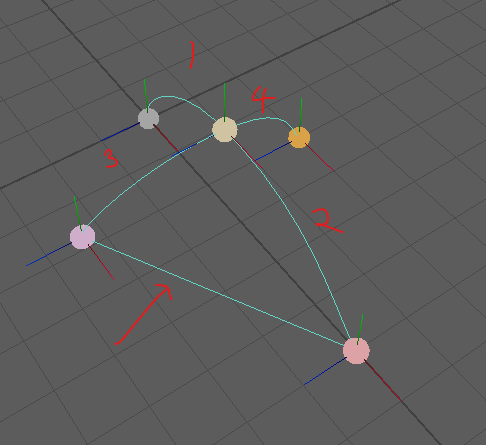
I’m working on a maya plugin where I’ll need to draw many curve shapes as part of a single object (potentially into the hundreds or thousands).
I’m trying to figure out a way to draw them all as part of a single MRenderItem, but I can’t insert a break in the primitive drawing using the kLineStrip geometry type - as shown, the end of one curve still connects to the start of the next.
I’ve found the kPatch geometry type, which supports a “stride” system for separate primitives, but from the maya examples I can’t work out how to use that for only lines - I could potentially turn each curve into a thin patch strip.
There’s also the consolidation system for MRenderItems, which I don’t understand at all.
Curious if anyone else has ever tackled this, or maybe keeping many separate MRenderItems isn’t a problem anyway.
I haven’t done anything with this myself, so I can’t give you specifics. But I have messed with some OpenGL programming and the Maya docs follow a familiar pattern. So I’m pretty sure you can’t use a kLineStrip to make disjoint lines. You’ll probably have to use kLines.
And I’m assuming you’re doing an MPxGeometryOverride? Does that mean you’ve overridden populateGeometry? So it looks like you’d populate the vertex buffer in there, and then your index buffer would have to be something like this: {0, 1, 1, 2, 2, 3, ...}
Which is a line from 0 to 1, then 1 to 2, then 2 to 3. Then, you’ll have the ability to skip a line segment when required.
MRenderItem represents a single renderable object, which I’m assuming means one draw call.
In that case you’d either have to render each kLineStrip using a separate draw call / MRenderItem, or use the method that @tfox_TD suggested, which is what I’d recommend as well.
I’m not sure how the API requires you to set that up for your scenario. If they don’t give you an index buffer you would just have to double-up the points using the kLines geometry type (A, B, B, C, C, D, etc…).
Thanks both, I don’t know why the kLines method didn’t occur to me but it’s pretty much what I wanted. As bad as it feels to double up the index buffers, it seems better than multiple render items - from talking with the rest of my team it seems each item does indeed map directly to (at least) one draw call.
I did also find a technique people use in base OpenGL to insert a max unsigned int value in a line strip geometry stream to cause a break in drawing, but trying the same thing in Maya just snaps that point to the origin, so that didn’t work either.
It may feel bad at first, but repeating indices is very normal. Triangle messages typically have an index buffer with 3 indices per triangle, and most gpus can handle millions of those per frame for games.
Even if you had 10,000 points, an index buffer with 20,000 indices would only be about 80kb of memory. The vertex buffer would be about 120kb. Still altogether only 200kb = 0.2mb total for that huge number of points.
Also, it’s usually faster to send a larger amount of data all at once than it is to wait on the gpu to be ready to receive new data for another draw. That being said, GPUs can usually do multiple hundreds of draws per frame for games even on low end systems.
Neither of these problems are going to be an issue for you though. These things are mainly to say… You shouldn’t worry about it. You’re not doing anything here where draw performance or VRAM are going to be any sort of limiting factor.
To put things in perspective, most text renderers use 4 points and 4-6 indices per character, and the common case for text is in the thousands of characters.