Maya Python HIK - Switch Source to None

Hi,

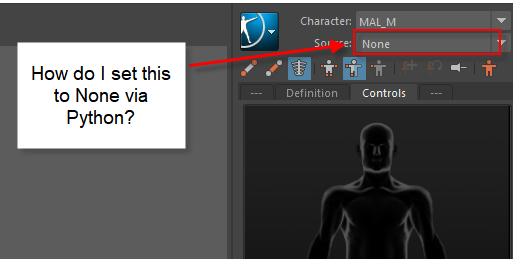
I’m looking for a way to change a HIK characters Source to None. I was able to find hikSetStanceInput , mayaHIKsetRigInput , and mayaHIKsetCharacterInput. But unable to find a command for changing the source to None.

Anyone know how to do this?

Thanks!!

image|513x259image

From memory;
You’ll need to show the UI.
Change the relevant dropdown to none.
Trigger a callback (replicating the UI)

I think I did this with a UI context manager (show UI on enter, close on exit).

I might have missed something though so don’t assume this is the best way :slight_smile:

it’s a bit of a pain as you have to source all the mel dependencies, hikGlobalUtils, hikInputSourceUtils
then you can switch the connections like this:

    mel.eval('hikSetCurrentCharacter %s' % hikNode)
    mel.eval('hikUpdateCharacterControlsUI 1')

We do this in the ProPack when we’re dealing with HIK binding. If anybody knows a better way I’d love to know

cheers
Mark

I’ve been having trouble with this too and have been using:

mel.eval('hikEnableCharacter("CCR", 0)')
mel.eval('hikUpdateSourceList()')

but it doesn’t work on referenced characters.
Going through the UI works for me using @ldunham1 method, but I can’t get your method to work @Mark-J - seems to get stuck in Stance mode no matter what I do.

Incidentally, I’m looking to do this via maya.standalone on a number of files so looking for a non-UI based solution as I’m guessing that’s not going to work.

Sorry to resurrect this one, but anyone figure this one out? The graph seems to disconnect the HIKStat2SK node from the skeleton when you set the input source to None. The characterization node is used to restored those connections when you set it back to Control Rig. I’m not sure what other changes need to happen. I hate this reverse engineering for something that should be so simple… in Motionbuilder it’s three properties you modify to get the result you want.
Hey Claudio, you’re right. It really should be simpler.

Fortunately, setting the HIK Source to ‘None’ is rather straightforward:

import maya.cmds as cmds
import maya.mel as mel

HIK_char = cmds.ls(type = "HIKCharacterNode")
mel.eval(f'hikEnableCharacter("{HIK_char[0]}", 0)') # Set source to 'None'
mel.eval(f'hikUpdateSourceList(); hikUpdateContextualUI;') # Update

If you want to go back to ‘Control Rig’ without running into any issues, the key is to run the update after modifying the Source.

mel.eval(f'hikEnableCharacter("{HIK_char[0]}", 1)') # Set source to 'Control Rig'
mel.eval(f'hikUpdateSourceList(); hikUpdateContextualUI;') # Update

Hopefully this clears things up :+1:
-Bryan

2 Likes