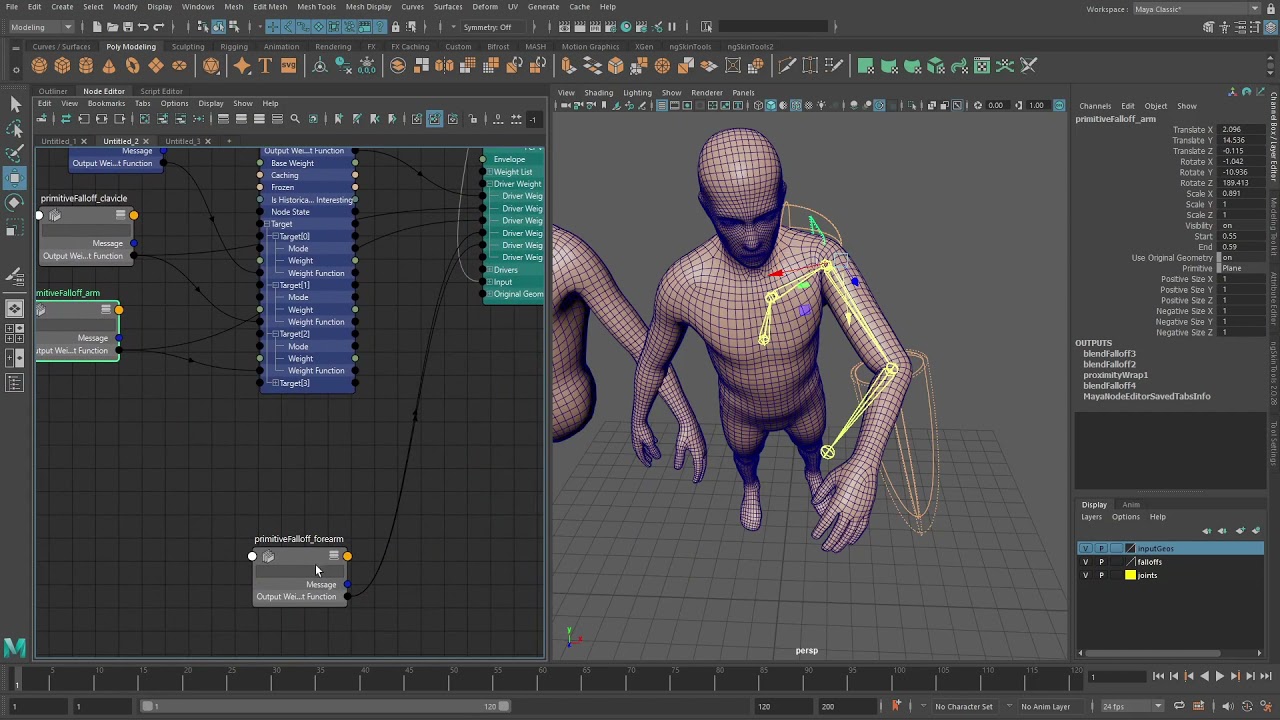
Just curious. I’m looking at this bind method again with falloff objects, but it seems incredibly tedious to setup the whole falloff stack per joint and getting the order correct based on index of joint etc. Fine in a demo video with 3 joints, not so much with a full body character rig.
Interested if anyone has successfully used it on a show.
So this is a half-answer to your question, but mostly it’s some history on that particular deformer and why I personally think it is the way it is:
Basically everything that Rhythm & Hues worked on before they went bankrupt. was using proximity wrap based rigs. (I worked there from 2007 'till it went bankrupt in 2013, and I’m making an educated guess that they were doing this at least as far back as 2001, and they continued to do so after the bankruptcy)
After R&H went bankrupt, the guy that wrote proximity wrap at R&H got hired by Autodesk. And along with Will Telford (Who used to be an R&H Rigger) ending up at Autodesk as the guy in charge of the rigging toolset, they brought a lot of voodoo-isms to Maya. This includes Falloffs, Proximity Wrap, the Morph deformer, Component Tags, and the OffsetParentMatrix. (Maya had Delta Mush already, but that came from a siggraph paper from R&H)
However, R&H used a proprietary software named Voodoo. Its structure was closer to the 3dsMax deformer stack, but simplified and streamlined. And it was amazing! There were no modeling tools to get in the way (modeling was done in maya/zbrush/whatever, and then referenced in). There were also no weight painting tools. Everything was done via component tags and falloff objects, and the UI was built to make interacting with those easy (at least easier than in Maya)
But Maya’s UI is not built for this workflow. There’s many UI’s and tools that Maya needs before I would want to make a proxwrap based rig. But with the right tools and workflow, it’s totally doable.
We used it on the Sonic 3 film rigs for the eye meniscus and eye lashes so that the deformation was live. We used a simplified extracted set of geo (3 edge loops around the inner eyelid geo) that we xfered the layered deformation over too, then live tracked to that with a proximity wrap. Doing that definitely made the meniscus track the inside of the eyelids much better.
That being said it’s a strange way that you have to set it up in the UI, make it, then open up the edit ui to assign the drivers etc. Just so alien to the rest of Maya deformer stuff.
Thanks Mark. Yeah, I use proximity wrap as a basic wrap deformer all the time, and for that it’s great – i was referring to the bind method that essentially uses proximity wrap as a skinCluster:
While cool, it requires some non-existent tooling to setup the deformer with falloffs per joint in the deformation chain etc as Tyler mentioned.
Alternatively you use the component falloff (per-component weights just like a skinCluster) but the painting tools are just the standard deformer weight painting, so pretty horrible to use in practise. And from what i gather this was a stop-gap entry point to getting proximity wrap binding & falloffs into more general use, and the idea is to not have to use per-component weights at all in the long run.
I’ll give an example of the major ui difference that made things easy: The channelbox.
Maya’s channelbox only shows one object at a time. Voodoo had the option to show multiple objects. There were two commands: Pick and Choose. I forget which was which, but they were kind of equivalent to “select” and “add to channelbox”. And there was an option to have ui selection NOT update the items in the channelbox. So it was easy to dial in settings on multiple interconnected objects simultaneously (like falloff objects, and the per-object proxwrap controls).
Lots of people on our CFX team had stored channelbox layouts per character, and had selection update turned off. That way they could drag falloff objects around to get the correct placement. But all the settings they messed with were safe in the channelbox.
There was an equivalent to the attribute editor that you could pop up per deformer. This attribute editor had tabs for the different values of the deformer. And every deformer had a single tab with all the options common to all deformers, and it was always in the same place. No hunting through mass of settings you don’t normally care about. For instance the component tags string, and the list of falloffs to apply to this deformer.
One of my “it would be cool to work on, but I probably won’t ever have time” tool ideas is to write a voodoo-style channelbox. But it’s gotta be JUST right since that would be a primary part of UX.
I also think a really cool idea would be to have a mini scripting language that would build the connections between existing falloffs because combining falloffs in the current setup is tedious